🚫 AdBlock Detected
To continue download, please disable your AdBlock:
- 👉 Click AdBlock icon on browser
- 👉 Choose "Pause on this site"
- 👉 Refresh this page
🚫 AdBlock Detected
To continue download, please disable your AdBlock:
- 👉 Click AdBlock icon on browser
- 👉 Choose "Pause on this site"
- 👉 Refresh this page

FL Studio remains one of the most popular digital audio workstations thanks to its unique pattern-based workflow and unmatched ease of use. It is especially favored by beatmakers, EDM producers, and hip-hop creators who need a fast and intuitive environment to sketch ideas and turn them into full tracks quickly. The piano roll is widely considered one of the best in the industry, allowing precise control over melodies, chords, and automation.
In recent versions, FL Studio has improved audio recording, mixing tools, and macOS compatibility, making it more versatile than ever before. While it may not be the first choice for recording live bands, it excels in electronic music production and creative sound design. Combined with lifetime free updates, FL Studio offers incredible long-term value, making it a top choice for both beginners and experienced producers.
- Best-in-class piano roll and MIDI editing
- Super fast workflow for beat making
- Lifetime free updates
- Huge plugin and preset ecosystem
- UI can feel cluttered at first
- Not ideal for recording bands
- Mac version slightly behind Windows

- Excellent MIDI editor
- Beginner friendly workflow
- Lifetime free updates
- Huge plugin ecosystem
- UI can feel cluttered
- Not ideal for recording
- Windows-first experience
Reason by Reason Studios Review (2026): A Creative Powerhouse DAW That Still Thinks Differently
-
Author: Adrian Vexley

Share:
Table of Contents
- Introduction
- Pricing & Plans
- System Requirements
- Interface & User Experience
- Core Features
- Performance & Stability
- Instruments & Effects
- Workflow & Productivity
- Pros & Cons
- Comparison
- Final Verdict
Introduction
For over two decades, Reason has carved out its own lane in the crowded DAW landscape. While most music production software evolves incrementally, Reason has always taken a different approach—leaning heavily into modularity, creative experimentation, and a tactile, hardware-inspired workflow.
Developed by Reason Studios, Reason began as a virtual rack of instruments and effects, mimicking physical studio gear. Today, it’s a fully-fledged DAW that competes directly with industry giants like Ableton Live, Logic Pro, and FL Studio.
But even in 2026, Reason still asks a fundamental question: What if your DAW felt like a creative instrument rather than just a timeline?
This review explores whether that philosophy still holds up—and more importantly, whether Reason is worth your investment today.

Pricing & Plans
- Reason+ Subscription – Monthly or yearly plan with full access to Reason and all Rack Extensions
- Reason (Perpetual License) – One-time purchase with lifetime ownership
- Reason Rack Plugin – Available as a VST/AU plugin for use inside other DAWs
Value Analysis:
The subscription model is particularly attractive for users who want access to a constantly expanding library of sounds and devices. Meanwhile, the perpetual license appeals to traditionalists who prefer ownership over recurring payments.
System Requirements
Windows:
- Windows 10/11 (64-bit)
- 8 GB RAM (16 GB recommended)
- Multi-core processor
Mac:
- macOS 11 or later
- Apple Silicon supported
- 8–16 GB RAM recommended
Interface & User Experience
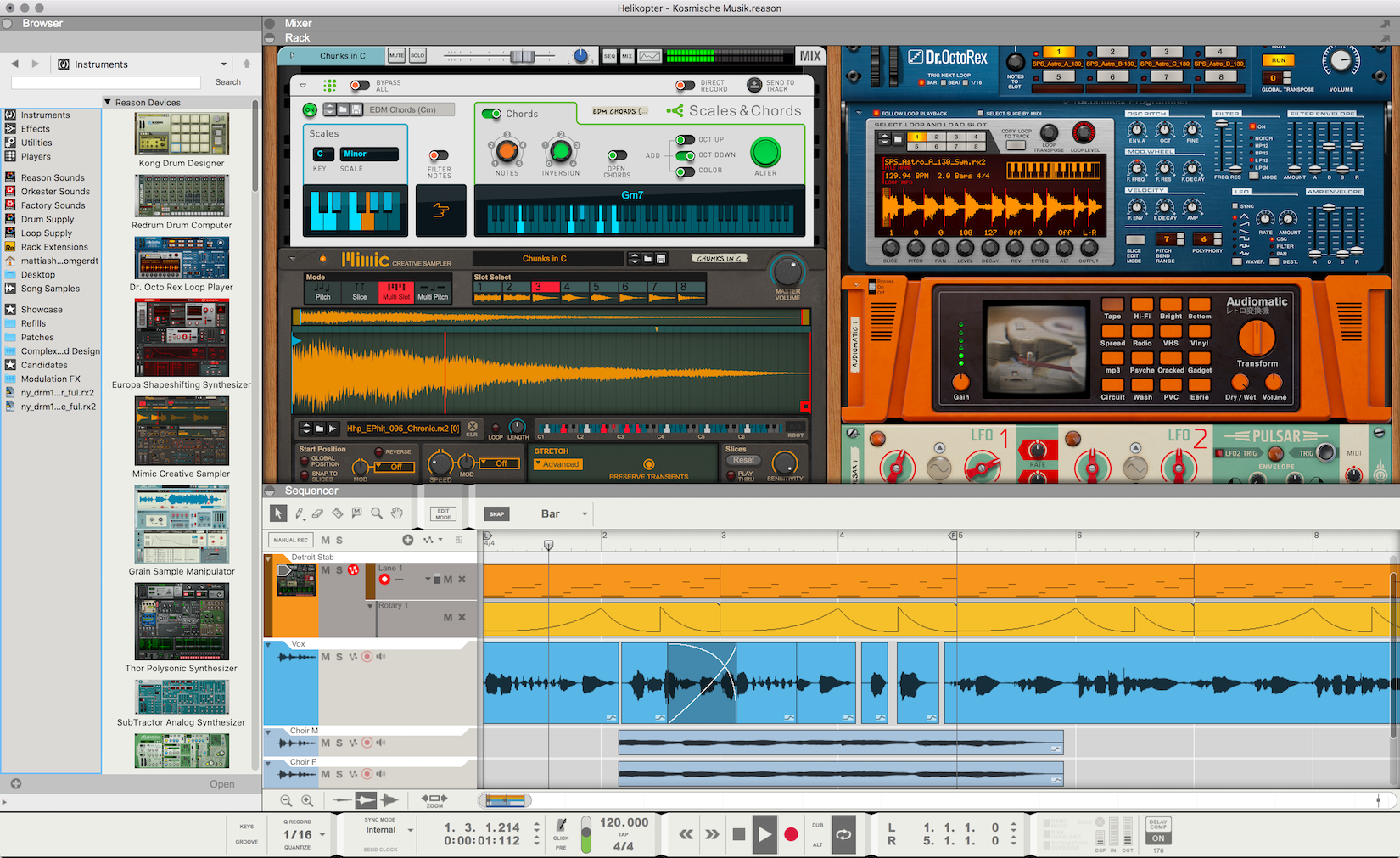
The defining feature of Reason is its virtual rack. Devices are stacked like real hardware units, and you can flip the rack to manually connect cables—something no other DAW does as elegantly.
- Highly visual and tactile workflow
- Deep routing flexibility
- Customizable layout
However, beginners may find it overwhelming at first, especially compared to more streamlined DAWs.
Core Features
Rack System
The core of Reason, allowing modular routing and creative sound design.
Combinator 2
- Advanced macro controls
- Custom interfaces
- Deep modulation
Reason Rack Plugin
Use Reason inside other DAWs—huge flexibility boost.
MIDI & Audio Tools
- Advanced MIDI editing
- Audio comping
- Time stretching
Performance & Stability
- Stable in long sessions
- Efficient with moderate projects
- CPU-heavy with complex racks
Instruments & Effects
- Europa (wavetable synth)
- Thor (modular synth)
- Kong Drum Designer
- Grain sampler
- RV7000 reverb
These tools are production-ready and competitive with paid plugins.
Workflow & Productivity
- Excellent for sound design
- Visual workflow helps creativity
- Slower for quick edits
Pros & Cons
Pros:
- Unique modular workflow
- Powerful built-in tools
- Stable performance
Cons:
- Learning curve
- Interface complexity
- Not the fastest DAW
Comparison
- Ableton Live: Faster workflow, less modular
- Logic Pro: Better value, less flexible routing
- FL Studio: Easier for beginners
Final Verdict
Reason is a DAW built for creativity. It rewards experimentation and deep sound design, but demands time to master.

Reason DAW
Best for Creative Sound Design & Modular ProductionReason by Reason Studios is a unique DAW built around a powerful virtual rack system, offering unmatched flexibility for sound design and creative music production in 2026.
✔ Pros
- Unique modular rack workflow
- Excellent built-in instruments and effects
- Highly stable and reliable performance
- Reason Rack Plugin adds flexibility
✖ Cons
- Steeper learning curve for beginners
- Interface can feel dense and cluttered
- Not the fastest workflow for quick edits
Comments
You May Also Like

GarageBand Review 2026: Is Apple’s Free

TikTok Music Trends 2026: Viral Songs,

Logic Pro Review (2026): Apple’s
Reason by Reason Studios Review (2026):

Ableton Live Review 2026: Still the